> ## Documentation Index
> Fetch the complete documentation index at: https://docs.pyne.ai/llms.txt
> Use this file to discover all available pages before exploring further.
# Wait Step
Use the `Wait` step (also known as Wait for Element) to ensure a specific page element is present or loaded before the guide proceeds.
**Key Characteristics:**
* **Purpose:** Handle situations where elements or page sections might take an unpredictable amount of time to load.
* **Avatar Behaviour:** The avatar pauses execution until the specified element is detected on the page.
The wait time can vary (0 seconds, 5 seconds, 10+ seconds).
* **Configuration:** Define the target element using a selector (e.g., CSS selector or XPath).
* **Impact if Skipped:** Crucial for stability. Skipping a needed `Wait` step can cause the guide to fail if subsequent steps depend on an element that hasn't appeared yet.
* **Common Use Cases:**
* Waiting for a new page section to render after navigation.
* Waiting for data to load into a table or dashboard.
* Waiting for a dropdown menu's options to populate after clicking it.
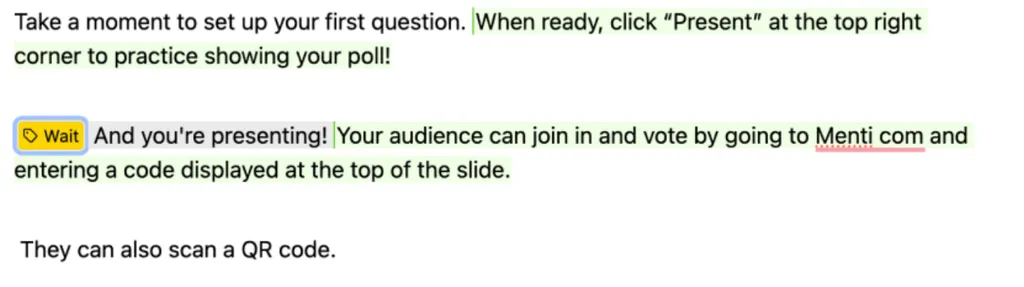
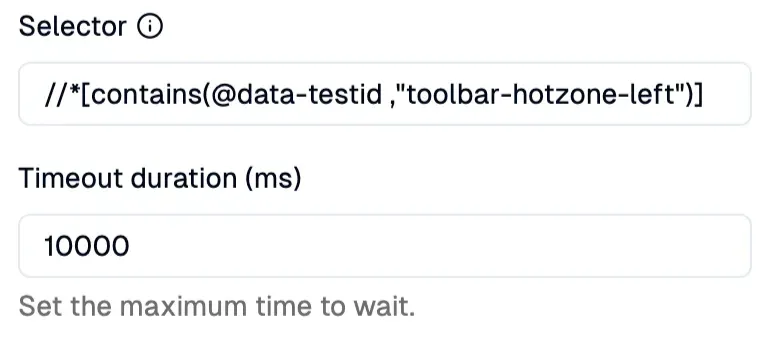
**\*Example**: In Mentimeter, the Presenting Mode takes time to load. A `Wait Step` ensures the guide only continues once a specific element (`//*[contains(@data-testid ,"toolbar-hotzone-left")]`) in the Presenting Mode appears.\*
*How it looks in the editor:*
 *Result:*
***
### Setup
Specify the target element (using CSS selector or XPath) that the guide should wait for in the right sidebar.
> **⚠️ Sleep vs. Wait:**
> You can often skip a `Sleep` step without breaking the guide (though it might affect the flow). However, a `Wait` step is often crucial to prevent errors if subsequent steps rely on elements that haven't loaded yet.
*Result:*
***
### Setup
Specify the target element (using CSS selector or XPath) that the guide should wait for in the right sidebar.
> **⚠️ Sleep vs. Wait:**
> You can often skip a `Sleep` step without breaking the guide (though it might affect the flow). However, a `Wait` step is often crucial to prevent errors if subsequent steps rely on elements that haven't loaded yet.