

Wait step (also known as Wait for Element) to ensure a specific page element is present or loaded before the guide proceeds.
Key Characteristics:
- Purpose: Handle situations where elements or page sections might take an unpredictable amount of time to load.
- Avatar Behaviour: The avatar pauses execution until the specified element is detected on the page. The wait time can vary (0 seconds, 5 seconds, 10+ seconds).
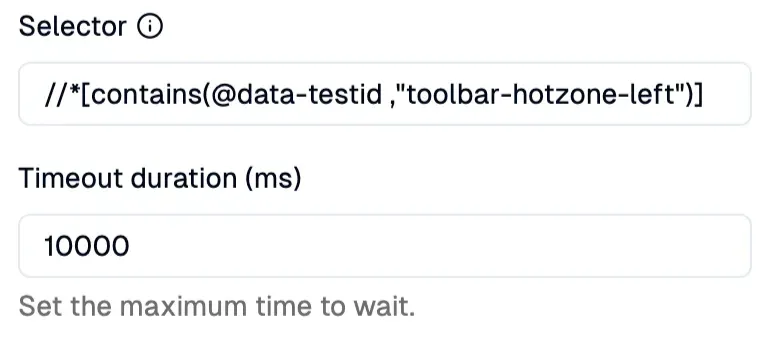
- Configuration: Define the target element using a selector (e.g., CSS selector or XPath).
- Impact if Skipped: Crucial for stability. Skipping a needed
Waitstep can cause the guide to fail if subsequent steps depend on an element that hasn’t appeared yet. - Common Use Cases:
- Waiting for a new page section to render after navigation.
- Waiting for data to load into a table or dashboard.
- Waiting for a dropdown menu’s options to populate after clicking it.
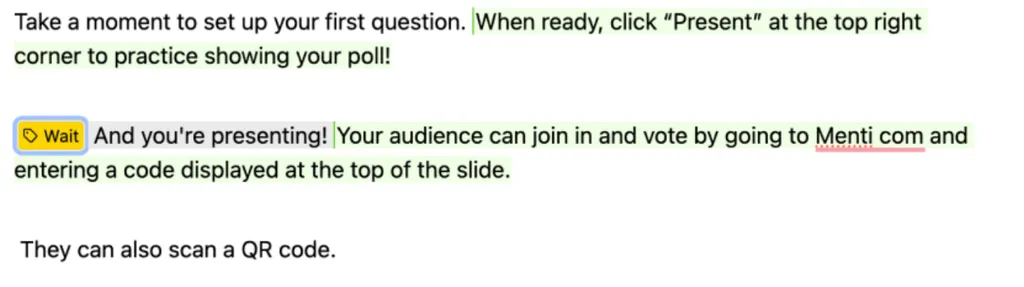
Wait Step ensures the guide only continues once a specific element (//*[contains(@data-testid ,"toolbar-hotzone-left")]) in the Presenting Mode appears.*
How it looks in the editor:
Setup
Specify the target element (using CSS selector or XPath) that the guide should wait for in the right sidebar.⚠️ Sleep vs. Wait: You can often skip aSleepstep without breaking the guide (though it might affect the flow). However, aWaitstep is often crucial to prevent errors if subsequent steps rely on elements that haven’t loaded yet.